Introduction
The FIDO Connector and associated APIs provided by Yubico with YubiKey as a Service - Enrollment, are used for FIDO Pre-reg integrations with identity providers (IdPs) to manage system interactions supporting pre-enrollment of credentials and shipment of YubiKeys.
Note
The Microsoft Entra ID integration with FIDO Pre-reg and the FIDO Connector is currently available in Early Access (EA). The Enroll app is currently available in Limited Early Access (LEA).
How it Works
The FIDO Connector is an orchestration component used in enrollment to handle credential and shipment requests. The Connector is deployed in the customer’s Azure environment, and provides APIs for for credential request creation and shipment of enrolled YubiKeys.
The current version of the FIDO Connector API supports the following features:
- Multiple identity providers: Create multiple credential requests to one or more IdPs, useful if your organization has more than one IdP for system authentication.
- Multiple credentials: Add multiple credentials on the same YubiKey, for example for different account types, as required by your end users.
- Multiple keys: Include, for example, a primary and a backup YubiKey programmed for the same account credentials, in a single request.
- On-site programming: Use the Enroll App (LEA) on a mobile device to program a YubiKey with credentials at your premises before it is handed over to an end user.
The image below provides an overview of the architecture with the FIDO Connector, one or more IdPs, the integration APIs used, and the services provided by Yubico.
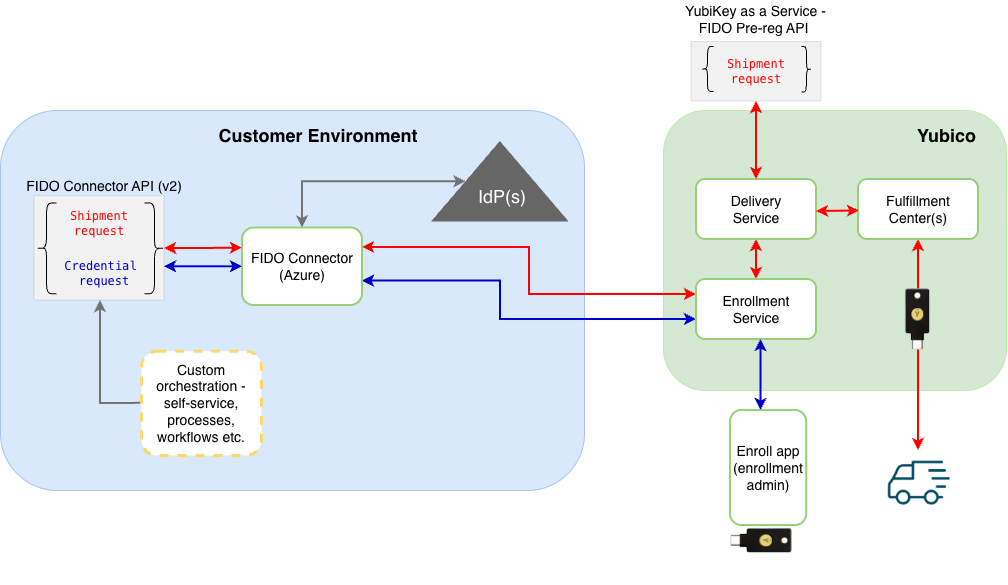
The following components are included:
- Identity providers (IdPs): The FIDO Connector supports Microsoft Entra ID, PingOne PingID, and PingOne AIC, see FIDO Pre-reg integration guides.
- Customer environment: IT system components, including the Azure environment where the FIDO Connector is deployed, see for example FIDO Pre-reg with Microsoft.
- Business system integrations: Integrations with for example an HR system providing recipient address information, or ServiceNow for triggering shipments of physical keys.
- Delivery Service: The Yubico-provided APIs for managing shipments of physical keys, with access to the Yubico Customer Portal for managing shipment statuses.
- Enrollment Service: Manages credential and shipment request data, provides APIs for managing on-site programming requests.
- Fulfillment Center(s): Yubico-managed programming and shipping of physical YubiKeys globally.
- Enroll app: Yubico-provided mobile app that lets an authenticated user (enrollment administrator) process programming of credentials, locally at their premises.
- API Calls: Calls to the FIDO Connector and YubiKey as a Service-FIDO Pre-reg APIs for requesting credentials and/or shipments of enrolled YubiKeys.
API Version and Feature Support
The following FIDO Pre-reg integration options are available:
- Using the FIDO Connector API v2 and v1
- Using the FIDO Pre-reg API (fido2PreRegisteredShipments)
The table below provides an overview of supported features for each integration option.
Feature
|
FIDO
Connector v2
|
FIDO
Connector v1
|
FIDO Pre-reg
|
|---|---|---|---|
Support for IdPs Microsoft Entra ID
PingOne PingID, and PingOne AIC (see note below).
|
Yes
|
Yes
|
Yes (see note
below)
|
Credential requests to multiple IdPs
in a single request.
|
Yes
|
No
|
Yes (see note
below)
|
Multiple credentials on the same key
in a single request.
|
Yes
|
Yes
|
No
|
Multiple keys with multiple credentials
in a single request.
|
Yes
|
No
|
Yes (see note
below)
|
On-site credential programming of keys for
handover to an end user locally.
|
Yes
|
Yes
|
No
|
End-user provided PIN when programming keys
locally on-site.
|
Yes
|
Yes
|
No
|
Shipment requests and credential requests
in the same request.
|
Yes
|
No
|
No
|
Shipment-only request of one or more keys,
programmed and shipped by Yubico.
|
Yes
|
Yes (one key)
only)
|
Yes (see note
below)
|
Note
The Okta integration only supports the FIDO Pre-reg API, not the FIDO Connector API, and only one enrolled key at the time can be shipped. See the FIDO Pre-reg with Okta Integration Guide.
Environment Variables
The following table lists environment variables that are common for FIDO Pre-reg integrations with different IdPs. The configured values can be updated in the Azure Container when needed. To obtain the status of current deployment components, see Check Deployment Status.
Note
A manual restart of the Azure Container might be needed for the updates to the environment variables to be recognized.
Variable
|
Default value (if not changed
by Environment Variable)
|
Comment
|
|---|---|---|
CRON_PROCESS_SHIPMENT_SCHEDULE
|
0 0 * * * *
|
The cron expression for the
schedule that checks ongoing
shipments and processes
them (v1 API).
The default setting is to run
every hour at the top of the hour.
It can be changed to any valid
cron expression, for example to
run every 30 minutes:
0 */30 * * * *
|
CRON_PROCESS_CREDENTIAL_REQUESTS
_SCHEDULE
|
0 0 * * * *
|
The cron expression for the
schedule that checks ongoing
credential/shipment requests
and processes them (v2 API).
The default setting is to run
every hour at the top of the hour.
It can be changed to any valid
cron expression, for example to
run every 30 minutes:
0 */30 * * * *
|
LOGGING_LEVEL_COM_YUBICO
|
INFO
|
Controls the level of information
that is logged by the application.
Can be increased to DEBUG if
trying to solve a configuration
issue. For normal usage, it is
highly recommended to leave it
as INFO.
|
ENTRA_FIDO_API_CHALLENGE_TIMEOUT_MI
NUTES
|
20160
|
Numeric value representing time in
minutes that the Entra FIDO
challenge is valid for.
|
CRON_DATA_CLEANUP_COMPLETED_DAYS
|
0
|
The below cron schedule will purge
‘complete‘ shipment records that
are older than this value.
0 = do nothing, no records will be
deleted, the schedule is
effectively disabled.
n = integer value means delete
‘complete‘ shipment items older
than today - n days.
|
CRON_DATA_CLEANUP_PENDING_DAYS
|
-1
|
The cron schedule will purge
records in non-complete states
(ongoing, pending_pin_sending,
error), with Timestamp older than
“today - pending-days”.
CRON_DATA_CLEANUP_COMPLETED_DAYS
and CRON_DATA_CLEANUP_PENDING_DAYS
must be configured together.
-1 values for both means the cron
job is disabled. Positive
values for both means the cron
job is enabled.
|
CRON_DATA_CLEANUP_SCHEDULE
|
0 30 * * * *
|
The cron expression for the
cleanup schedule that purges
‘complete’ shipments and their
secrets from the Azure table
and vault.
The default setting is to run
at every 30 minutes past the hour.
|
CRON_PROCESS_CREDENTIAL_REQUES
TS_RETRY_NUMBER_DAYS
|
14
|
Numeric value representing how
many days a credential request
will keep retrying after an
initial failure.
|
AZURE_KEY_VAULT_SECRET
_EXPIRATION_MINUTES
|
64800
|
Controls the Key Vault secret
expiration time. Default value
is 64800 minutes
|
Note
The encrypted credential response including the PIN, is automatically purged after 90 days. Data associated with the shipment request itself, for example recipient name and address, email address, and telephone number, is kept by Yubico for 7 years, in order to comply with export control and financial legal requirements.