How it Works
With FIDO Pre-reg the IT administrator (IT admin) for an organization can use the YubiKey as a Service API together with the WebAuthn API of an Identity Provider (IdP) and automated workflows to order pre-enrolled YubiKeys for end users. The YubiKeys are pre-enrolled and shipped directly to the specific end user who received a randomly generated PIN separately.
The following sections describe how to integrate FIDO Pre-reg with Microsoft Entra ID. The instructions are intended for IT admins who are setting up shipments of pre-enrolled YubiKeys for their organization’s end users in an environment using Microsoft Entra as IdP.
The instructions assume you have IT administration skills and knowledge of the YubiKey as a Service API, Microsoft Azure, and Entra ID. Listed tasks include steps performed both in the Customer Portal and Microsoft Azure/Entra ID. Refer to the Microsoft documentation for more details.
Process Flow
The image below provides an example of a customer environment setup using Microsoft Azure components and Microsoft Entra ID as IdP.
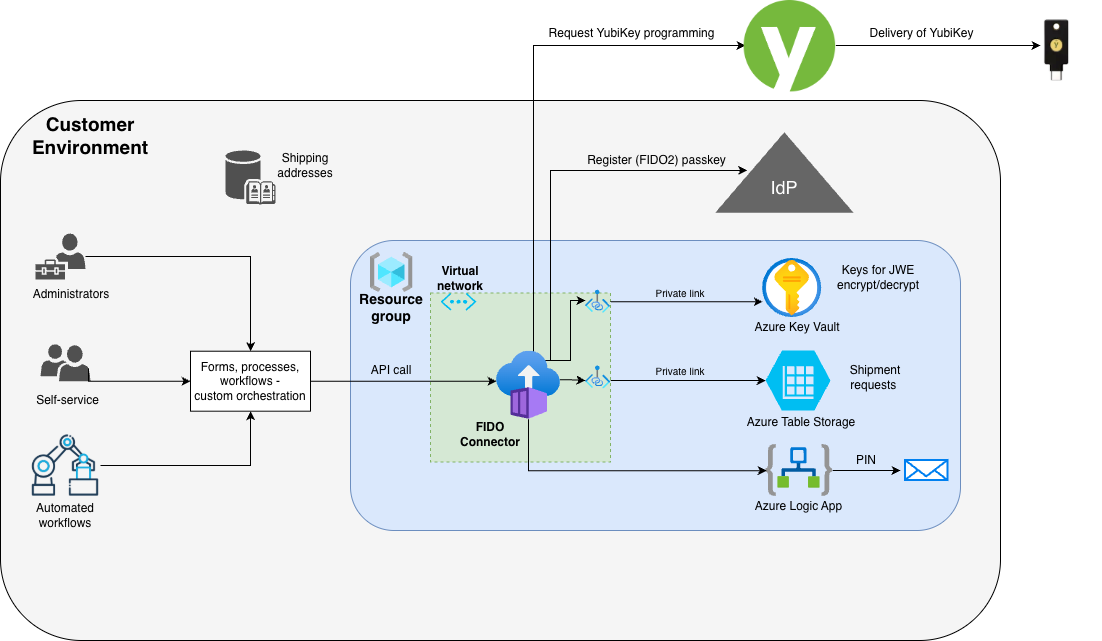
The following steps illustrate the pre-enrolled end-to-end credential/YubiKey delivery flow:
- An authorized user (or process) triggers a credential/YubiKey request for a user in Microsoft Entra ID via a front-end or IT Service Management (ITSM) orchestration platform.
- The request is received by the FIDO Connector which is deployed on the customer infrastructure. The connector then makes a request over Microsoft Graph API to retrieve the necessary parameters required to create a device-bound passkey credential.
- Microsoft Entra ID returns the passkey credential creation parameters for the target user to the FIDO Connector which then encrypts the information as a credential request.
- The FIDO Connector creates a shipment request to the Delivery service including the form factor and shipping information, and attaches the encrypted credential request.
- After passing through the Delivery service, the FIDO Connector decrypts the credential request and creates the credential (user private key) for the specified YubiKey form factor. The attestation response from the credential creation is then encrypted.
- Yubico ships the YubiKey to the intended end user.
- The FIDO Connector continuously checks the Delivery service for updated shipment status.
- When the shipment reaches status “Shipped” in the Delivery service, the FIDO Connector captures the shipping information including tracking number, serial number, firmware version, and encrypted credential response and PIN.
- The shipment status is updated in the customer’s front-end system of choice.
- The credential response is decrypted by the FIDO Connector.
- The YubiKey device-bound passkey credential (user public key) is registered in Microsoft Entra ID through the Microsoft Graph API.
- The PIN is decrypted and provided to the customer’s delivery system of choice.
- The PIN is communicated to the targeted end user.
- The end user authenticates to Microsoft Entra ID using their YubiKey and PIN. If the PIN was configured for one-time use, the user will be prompted to change the PIN.
The following sections provide an overview of solution features and components.
Customer Environment
The customer environment contains the orchestration components needed to support the FIDO Pre-reg processes for requesting enrollment credentials and shipment of pre-enrolled YubiKeys.
Interaction between components in the customer environment includes the following:
- Initiate the registration of credentials in the IdP, on behalf of end users.
- Communicate through APIs to request enrollment credentials and shipment of keys.
- Get recipient addresses from for example an HR system, for shipments of physical keys.
- Communicate with end users to provide the PIN, separate from the physical key delivery.
The orchestration components can be implemented in any number of platforms, automation tools, or code. For example for Microsoft Azure customers, the orchestration requirements can be fulfilled using services like Azure Logic Apps, Azure Function Apps, or other services in their Microsoft Azure subscription.
Different components and orchestrations can be used for different use cases. An onboarding YubiKey issuing workflow can be completely automated using Identity Governance and Administration (IGA) tooling. Other self-service workflows or admin-requested YubiKeys might involve manager approvals using ITSM tooling like ServiceNow.
Yubico provides the FIDO Connector that can be deployed to Microsoft Azure to perform the most complex orchestration parts. See FIDO Connector.
The orchestration components implement the client-side of the encryption/decryption scheme. This supports the encryption/decryption of individual elements in the credential request and response messages so that the PIN and other passkey credential information remains accessible only to the orchestration components. See Security Features.
FIDO Connector
The FIDO Connector is deployed in the customer’s Azure environment, and provides a service API for interacting with the IdP:
- Exposes an API that can be called from forms, processes, and workflows in the customer environment. See FIDO Connector API (FIDO Connector Integration Guide).
- Performs all interactions with the Microsoft Graph API for registering credentials and YubiKeys in a Microsoft Entra ID tenant.
- Performs all transport encryption before securely transmitting the credential information from the orchestration components to the Yubico Enrollment service.
- Keeps track of pending shipments and actively polls the Yubico Delivery service to check on status and updates to pending pre-enrollment requests.
- Decrypts and verifies the authenticity of the response from the Enrollment service.
- Completes the registration of the credentials and/or the YubiKey with the IdP.
- Emails the PIN to the correct contact.
An instance of the FIDO Connector can be configured to run with multiple IdPs. As default, the FIDO Connector is configured to be used with Microsoft Entra ID. For more information, see Enabling Multi-IdP Support (FIDO Connector Integration Guide).
Integrating with the FIDO Connector also supports on-site programming of credentials by enrollment administrators using the Enroll app (LEA). For more information on how to use the FIDO Connector API to create credential and shipment requests, see FIDO Connector API (FIDO Connector Integration Guide).
Security Features
The following provides an overview of security features of an implementation of FIDO Pre-reg with Microsoft Entra ID.
Microsoft Entra ID Access
Yubico has no access to enroll and/or activate user passkey (FIDO2) credentials directly into a customer’s Entra ID tenant.
Pre-enrolled Credentials
Because Yubico has no access to the customer’s Microsoft Entra ID tenant, Yubico registers authenticators (YubiKeys) using the passkey credential creation parameters provided in a customer-initiated shipment request. The credential responses are then returned for retrieval by the customer orchestration, and the credential details are used by the customer orchestration to register YubiKeys with Microsoft Entra ID.
PIN Provisioning
Yubico generates a PIN for a given YubiKey and returns it to the Delivery service for retrieval by the customer orchestration, which then decides how that PIN gets communicated to the end user.
Transport Encryption
To mitigate the risk of exposing sensitive information, for example creation parameters, serial numbers, and PIN related to YubiKey assignments within the Delivery service, all data transferred from the Yubico environment to the customer orchestration system is encrypted using a secure transfer mechanism. This ensures that Yubico personnel and systems have no access to or visibility into, any credential-related data at any stage of the process.